How to Scale Your Shopify Store: A Comprehensive Guide for Sustainable Growth
By Thomas Vu · Published · Updated
Scaling a Shopify store means growing orders faster than your costs, refunds and workload grow. A store can stall long before demand runs out, because margin, stock accuracy, cash or time runs out first.
This guide puts the work in order: check the numbers first, fix the operations that break under extra volume, make the store fast and checkout easy, then add traffic. Each step links to Shopify's documentation or the research behind it, so you can check the details yourself.
Key takeaways
- Scale only what's profitable per order. Know your contribution margin and how many orders a new customer needs to place before they've paid back what it cost to win them.
- Fix stock and fulfillment before buying traffic. Paying for visits to sold-out products or orders you can't ship on time burns money.
- Speed and checkout are measurable. Google treats a page as "good" when LCP is 2.5 seconds or less, INP 200 ms or less and CLS 0.1 or less (web.dev). Extra costs are the top reason shoppers abandon checkout in Baymard Institute's research.
- Add channels one at a time, and judge each by margin after ad spend, not by revenue.
- Plan cash alongside stock. Reorder points and Shopify's inventory reports show what you'll need to buy before a campaign sells it.
Are you ready to scale? Check three numbers first
Growth multiplies whatever your store already earns per order. If each order makes money after marketing, scaling makes more. If it loses money, scaling loses it faster.
- Contribution margin is what each order leaves to pay for marketing and overheads: average order value minus product cost, shipping, payment fees, packaging and the average discount.
- Customer acquisition cost (CAC) is marketing spend in a period divided by new customers won in that period. Work it out per channel as well as overall.
- Payback is CAC divided by contribution margin per order: the number of orders a new customer must place before they've paid for themselves.
Here's a worked example with round numbers. A $60 order with $24 product cost, $8 shipping, $2.50 payment fees and $1.50 packaging leaves $24 of contribution margin. If CAC is $36, each new customer needs 1.5 orders to pay back. That works if plenty of customers buy again within a few months. It doesn't if most buy once.
Shopify's Returning customers and Customer cohort analysis reports show how often customers come back. The cohort report groups customers by the month of their first order and tracks what each group does afterwards (Shopify Help Center).
Then check operations against your last busy week, such as a launch, a sale or your holiday sales peak. Did orders ship on time? Did anything oversell? How long did customers wait for support replies? Whatever broke in your busiest week is likely to break every week once volume doubles.
Fix operations before you add traffic
Every extra visitor you pay for lands on your product pages, your stock levels and your fulfillment. Fix those first.
Keep stock accurate and sold-out products out of the way
- Track inventory on every variant, and decide per product whether to keep selling when it's out of stock (for pre-orders) or stop.
- Get warned before you sell out. Shopify Flow, a free automation app on the Basic, Grow, Advanced and Plus plans (Shopify Help Center), has templates that email your team when a variant's stock runs low.
- Decide how sold-out products appear. Shopify lists four ways to hide them: collection conditions, the default catalog collection, an inventory app, or the Flow template "Publish and unpublish products based on inventory level" (Shopify Help Center). Our guide to hiding sold-out products and variants compares the options.
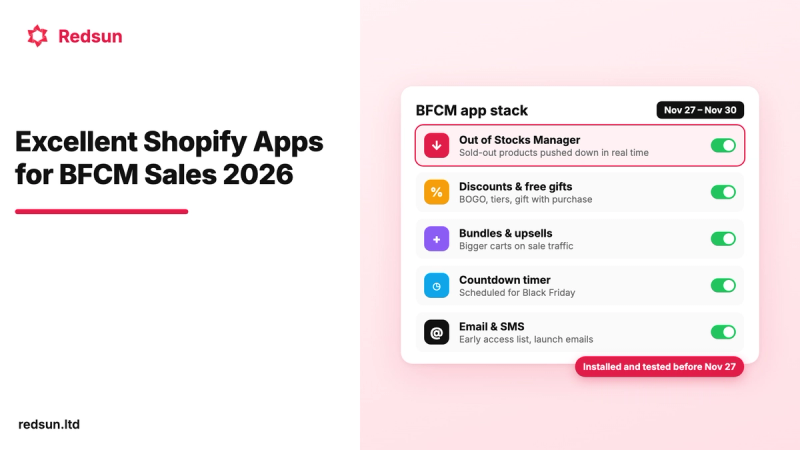
Hiding isn't always right. If a product is coming back, keep its page live so it keeps its search traffic, and move it to the end of collections so in-stock items show first. Our app Out of Stocks Manager does that automatically as stock changes.
Plan cash and stock together
Stock-heavy stores can run short of cash while sales are still growing, because you pay suppliers weeks before the goods sell. Plan purchases from your sales data rather than your bank balance.
- Set a reorder point for each best seller: average daily sales × supplier lead time in days + safety stock. For example, 8 units a day with a 21-day lead time and 40 units of safety stock means reordering when stock reaches 208 units.
- Use Shopify's inventory reports for the inputs. "Inventory sold daily by product" shows average units sold per day, and "Inventory remaining per product" estimates how many days each variant's stock will last, based on the last 28 days of sales (Shopify Help Center).
- Put cash into your A products first. The ABC product analysis report grades variants by share of revenue over the last 28 days: A products make up 80% of revenue, B the next 15% and C the last 5%.
- Fund the stock before you fund the ads. If a campaign doubles sales of a product, you'll need roughly twice the stock, and you'll usually pay for it before the extra revenue arrives.
Make fulfillment repeatable

- Write down your pick, pack and ship steps so someone other than you can do them, and track time from order to shipment every week.
- Automate labels and tracking emails with Shopify Shipping (where it's available) or a shipping app, so busier days don't mean more typing.
- Promise delivery times you can hit. Slow delivery is the second most common checkout-abandonment reason in Baymard's research (20%), and missed promises turn into support tickets.
- Consider a third-party logistics (3PL) warehouse when packing takes more of your week than selling, or when you need faster delivery in a second region. Get quotes based on your real order profile (units per order, number of SKUs, return rate), because that's what 3PL pricing depends on.
Automate repetitive admin with Shopify Flow
Pick the task you repeat most often each week and automate that first. Good first workflows:
- A low-stock email to whoever reorders.
- Hiding products when they sell out and republishing them when stock returns, using the template above.
- Holding high-risk orders for review. Shopify's risk templates start from the "Order risk analyzed" trigger, and one of them prompts a review before payment is captured if you capture payments manually (Shopify Help Center).
Keep support response times steady
Support work grows with every order, so plan for it before replies start slipping.
- Answer common questions where shoppers ask them. Put sizing, delivery times and returns on the product page, so fewer people need to email.
- Send tracking automatically and use saved replies for order status, returns and delivery questions, so "where's my order?" emails don't grow with volume.
- Track first response time weekly next to order volume. If response times rise with orders, hire or outsource support before reviews suffer.
Make the store fast and checkout easy
Two things decide whether paid traffic turns into orders: how quickly your pages respond, and how much friction shoppers hit at checkout. You can measure both.
Hit Google's Core Web Vitals thresholds
Google measures three Core Web Vitals at the 75th percentile of real visits, separately for mobile and desktop (web.dev). Shopify shows the same three metrics, from your own visitors, in the web performance reports in your admin (Shopify Help Center).
Speed affects sales, not just rankings. In a Deloitte study commissioned by Google, a 0.1-second improvement in mobile site speed was linked to an 8.4% increase in retail conversions, and retail shoppers spent 9.2% more. The gains only appeared when every page in the shopper's journey got faster (web.dev case study). The study dates from 2020, so treat the exact figures as a direction rather than a promise.
On Shopify, the biggest speed wins are usually simple:
- Remove apps you don't use. Some apps add code to your theme that isn't removed when you uninstall them, so check with the developer for clean-up steps (Shopify Help Center).
- Keep the top of the page light. Compress the hero image and avoid autoplay video or multi-slide carousels above the fold.
- Check mobile and desktop separately. Google assesses them separately, so a fast desktop result can hide a slow mobile store.
Remove checkout friction
Baymard Institute puts the average documented cart abandonment rate at 70.22%, based on 50 studies. Much of that is unavoidable: 42% of US online shoppers say they've abandoned a cart because they were just browsing (Baymard Institute). Set those aside and the remaining reasons are mostly fixable.
- Show shipping costs and taxes early, on the product page or in the cart, so the total isn't a surprise. If your margin allows it, set a free-shipping threshold a little above your current average order value.
- Offer [accelerated checkouts](https://help.shopify.com/en/manual/payments/accelerated-checkouts), such as Shop Pay, Apple Pay or Google Pay, so returning shoppers don't have to type in card details.
- Don't make an account a condition of buying.
- Put your returns policy where shoppers decide, near the add-to-cart button as well as in the footer.
Baymard estimates that the average large ecommerce site can gain a 35.26% increase in conversion rate through better checkout design. For a store-level checklist, see why your conversion rate is low.
Grow revenue per customer, not just customer count
Repeat customers make every acquisition dollar go further. Research by Frederick Reichheld of Bain & Company found that increasing customer retention rates by 5% increases profits by 25% to 95%. The same Harvard Business Review article notes that acquiring a new customer can cost five to 25 times more than keeping one (HBR, 2014). The research is old, but the logic is the same as the payback calculation above: the more often customers return, the more you can afford to pay to win them.
- Raise order value with bundles and add-ons that genuinely go together, not discounts on everything.
- Send emails timed to the product, such as how-to-use tips after delivery, a review request once they've used it, and a reorder reminder for consumables.
- Offer subscriptions for products people run out of, so repeat revenue doesn't depend on a reminder landing.
- Check the effect in the cohort report. If newer cohorts return more often than older ones, your retention work is paying off.
Add marketing channels in order
Each channel adds work, so add them one at a time and keep the ones that pay for themselves on contribution margin.
Channel | Best for | Watch out for | Measure |
|---|---|---|---|
Email and SMS | Repeat purchases from people who already know you | List fatigue and consent rules | Revenue per recipient, unsubscribe rate |
Search (SEO) | Steady traffic that builds over time | Results take months, not weeks | Organic sessions and conversion rate by landing page |
Paid search and social ads | Fast tests of new products and audiences | Costs usually rise as you increase spend | CAC and payback by campaign |
Marketplaces | Reaching shoppers who start their search there | Fees and price competition | Contribution margin after marketplace fees |
AI shopping assistants | Shoppers asking ChatGPT, Gemini or Copilot what to buy | Your product data decides whether you're recommended | Referral traffic and orders from AI tools |
Strong product data helps almost every channel. Our guides to adding products to Shopify and getting into AI shopping answers cover what to fill in.
Know what to measure at each stage
Stage | Main focus | Metrics to watch |
|---|---|---|
Finding repeatable sales | Unit economics | Conversion rate, average order value, contribution margin per order |
Scaling ad spend | Efficient acquisition | CAC and payback by channel, returning customer rate |
Running several channels with a team | Retention and operations | Cohort retention, order-to-shipment time, stockouts, support response time |
When to upgrade your Shopify plan or get help
You don't need Shopify Plus to grow. Shopify Flow, for example, is included on every plan from Basic up. Upgrade when a specific feature or fee saving on a higher plan pays for the difference. Shopify's US pricing in October 2026:
Plan | Price (billed yearly) | Price (billed monthly) | Extra staff accounts | Inventory locations |
|---|---|---|---|---|
Basic | $19/month | $25/month | None | 10 |
Grow | $49/month | $65/month | 5 | 10 |
Advanced | $299/month | $399/month | 15 | 10 |
Plus | Not listed | From $2,300/month | Unlimited | 200 |
Prices vary by country, so check Shopify's pricing page for yours and compare the card rates on each plan.
For outside help, hire for whatever is blocking growth right now, not the job you like least. Freelancers suit one-off specialist work such as theme changes or an ad account audit. An agency makes sense when you need a team running a channel week after week. Shopify's Partner Directory lists partners by service.
Common scaling mistakes
- Raising ad spend before you know payback. Revenue grows while the bank balance shrinks.
- Treating revenue as profit. Track contribution margin per order, and recheck it when shipping rates or supplier prices change.
- Letting stock accuracy slip. Overselling creates refunds, angry emails and lost repeat customers.
- Installing an app for every problem. Each one adds a monthly fee, and some slow the store down.
- Depending on one channel. One algorithm change or account suspension can cut sales sharply overnight.
FAQ
When should I start scaling my Shopify store?
Start when a new customer pays back their acquisition cost within a timeframe your cash flow can carry, and when your last busy week passed without overselling or late shipments. If either isn't true yet, fix that first, because more traffic will make it worse.
Do I need Shopify Plus to scale?
No. Shopify Flow is available on Basic, Grow, Advanced and Plus, and most scaling work happens long before Plus is worth its starting price of $2,300 a month. Move up when you need something only Plus offers, such as more than 10 inventory locations or unlimited staff accounts.
What's a good conversion rate for a Shopify store?
It depends on your category, prices and traffic mix, so a single benchmark can mislead you. Track your own rate by traffic source and device over time, and fix checkout friction first, since that affects every visitor who's ready to buy.
Should I hide out-of-stock products while I scale?
Hide products that aren't coming back. For products that will be restocked, keep the page live, mark it clearly as sold out and move it below in-stock items, so you keep its search traffic without cluttering collections.
Where to start this week
- Work out contribution margin and payback for your best-selling product.
- Fix the biggest operational problem from your last busy week.
- Then scale one channel, and measure it by margin rather than revenue.