How to Import Reviews from AliExpress to Shopify (and What to Fix Before They Go Live)
By Thomas Vu · Published
To import reviews from AliExpress to Shopify, install a review importer app such as the free Judge.me Ali Reviews Importer, open the Shopify product, paste the AliExpress product URL, set your filters and click Import. A review app then shows the imported reviews on your product page. Loox does the same with a bookmark button, and several free apps export the reviews to a CSV file for any review app.
The import itself takes a few minutes. Making the reviews safe and useful takes longer. We ran a real import on our test store on October 21, 2026, and the 30 reviews that came in had problems you'd want to catch before customers see them. This guide covers the rules, the app options, three ways to import, and a cleanup checklist that applies whichever method you use.
Key takeaways
- Paste the URL yourself. Judge.me's new auto-match picked a different AliExpress product for our bracelet, and one suggestion was a 10-pack of steel pendants.
- Read every review before it goes live. Our 30 imports included invented reviewer names, two duplicate pairs and four reviews praising the AliExpress seller's delivery.
- Only import reviews of the same product. A review of a different product misdescribes what your customer gets. The FTC dropped a specific ban on this in 2024, but its rule against reviews that misrepresent the reviewer's experience still applies (16 CFR 465.2).
- Say where the reviews came from. In the EU, telling shoppers whether and how you check reviews is required information (Directive 2019/2161).
- Keep them out of Google's stars. Judge.me already leaves AliExpress imports out of its Google Shopping sync and the Shop app, but its docs describe no way to leave imported reviews out of product-page review markup.
Is it OK to import AliExpress reviews?
Generally yes, as long as the reviews are about the exact product you sell and you're upfront about where they came from. It turns into a problem when the reviews describe a different product, when they look like your own customers wrote them, or when you only import the five-star ones. This isn't legal advice. These are the rules most relevant to imported reviews, so check with a lawyer if you sell into a market with stricter rules.
The FTC rule (US). The FTC's rule on consumer reviews took effect on October 21, 2024. It makes it illegal for a business to write, create, sell or buy consumer reviews that materially misrepresent that the reviewer exists, that they used the product, or what their experience was (16 CFR 465.2). An AliExpress review of the same bracelet describes a real buyer's experience with that bracelet. A review of a different bracelet doesn't.
The FTC also proposed a specific ban on reusing reviews written for a "substantially different product", then dropped it from the final rule because it couldn't resolve commenters' concerns about that definition (Federal Register). So the FTC hasn't said exactly how the final rule treats reused reviews. But a review of a different product doesn't describe what your customer will receive, and that's the kind of misrepresentation the rule is aimed at.
The EU rule. The Omnibus Directive changed the Unfair Commercial Practices Directive so that, when a business shows consumer reviews, information on whether and how it makes sure they come from people who actually bought or used the product counts as material information (Directive 2019/2161). Leaving it out can be a misleading omission. A note such as "Some reviews are imported from AliExpress buyers of this exact product. AliExpress marks them as verified purchases; we don't verify them further" is one way to give that information, because it says both where the reviews came from and how they were checked.
Google. Google's review snippet guidelines say "Don't aggregate reviews or ratings from other websites" (Google Search Central). For Merchant Center, Google says you must collect and own the reviews you send and that it doesn't accept reviews syndicated from other sources (Merchant Center Help).
In practice that gives you three rules (same product only, say where the reviews came from, keep imported reviews out of anything that feeds Google's review stars) plus one honest default: don't filter out the low ratings. The checklist below shows how to do each.
Which app should you use?
Pick by where the reviews will be shown. If you already use Judge.me or Loox to display reviews, use their importer. If you use another review app, pick an importer that exports a CSV your app can read.
We checked each listing on the Shopify App Store on October 21, 2026.
App | Price | AliExpress limit | How you get reviews out | App Store rating |
|---|---|---|---|---|
Judge.me Ali Reviews Importer | Free | Up to 500 per import | Syncs to Judge.me or exports a CSV | 4.9 (239) |
Trustoo Ali Reviews Importer | Free | Not stated | CSV export, Trustoo sync | 4.9 (104) |
Ali Reviews (FireApps) | Free; Basic $14.95/mo | 10 published per product free, 150 on Basic | Its own review widget | 4.8 (1,442) |
Loox | Free Beginner; Convert $49.99/mo | 20 per import free, 100 on Convert | Its own review widget | 4.9 (9,917) |
PX Aliexpress Reviews Importer | Free; $6.95/mo | 100 per product free, 600 paid | Its own widget, CSV import | 5.0 (7) |
Ryviu: AliExpress Reviews | Free; $9.90/mo | 5 products and 100 reviews free | CSV export | No ratings yet |
Loox's per-import limits come from the Loox Help Center. Judge.me's 500 cap comes from the Judge.me Help Center. The rest come from each app's listing.
Method 1: Import with the Judge.me Ali Reviews Importer
This is the free route most dropshippers use. The importer stores the reviews, and the free Judge.me Product Reviews app shows them on your storefront. We used it on our test store, which runs Shopify's sample jewelry catalog.
- Install the importer. Search the Shopify App Store for "Judge.me Ali Reviews Importer" and install it. The old Chrome extension is no longer supported, so use the app inside your admin (Judge.me Help Center).
- Find the AliExpress listing. Open the exact product you sell on AliExpress. The URL must end in
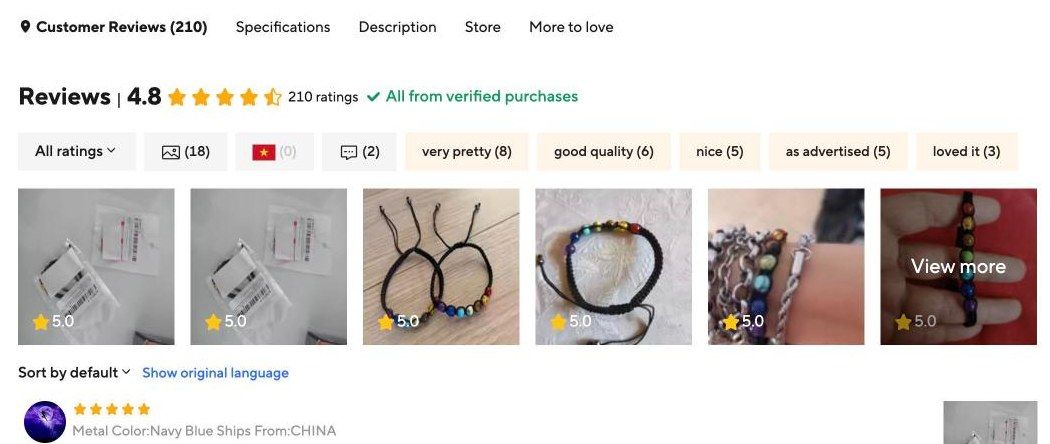
.htmland point to a single product page, not a category (Judge.me Help Center). Our listing for a braided 7 chakra bracelet showed 210 ratings with an average of 4.8. - Click Import next to your Shopify product. In the dialog, choose Enter AliExpress URL, not Auto-match product. More on why below.
- Set the filters. Open Show filter settings and choose a translation language, the number of reviews, countries, a minimum word count and whether reviews must have pictures.
- Click Import reviews and wait. The import runs in the background. Ours finished within a few minutes and showed "Import complete" in the Reviews import log.
- Clean up, then display. Open the product's imported reviews list and work through the cleanup checklist below. Then show them with Judge.me Product Reviews, or click Export reviews to get a CSV.
- Decide on Google stars. Judge.me adds review markup to product pages by default (see the section on Google's stars below).
Don't trust auto-match
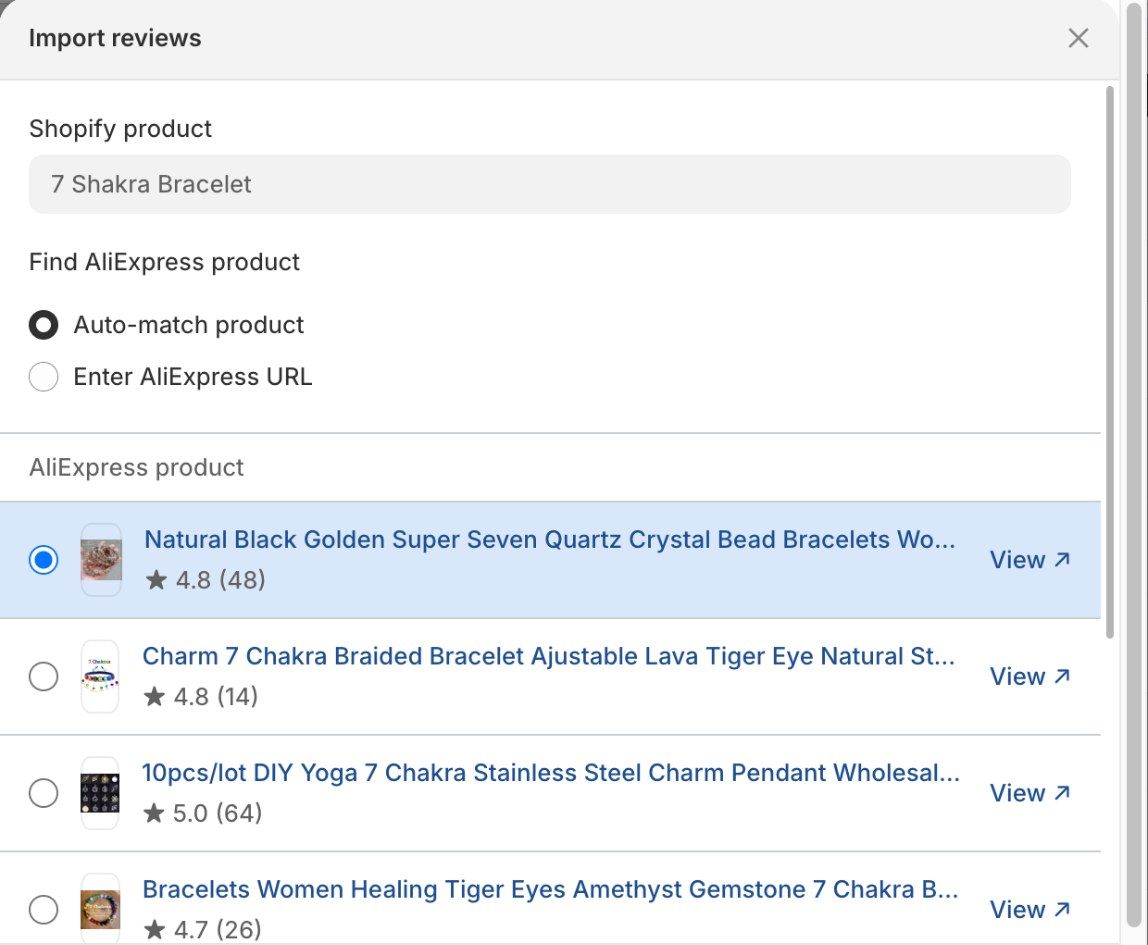
When we opened the import dialog for our "7 Shakra Bracelet" product, Judge.me's Auto-match product option was selected by default and had already picked an AliExpress listing: "Natural Black Golden Super Seven Quartz Crystal Bead Bracelets". That's a different product. The third suggestion was "10pcs/lot DIY Yoga 7 Chakra Stainless Steel Charm Pendant", which isn't a bracelet at all.
Importing reviews from any of those would put another product's reviews on your page, which is the kind of misrepresentation the FTC rule targets. Judge.me's bulk import also matches by product title (Judge.me Help Center), so check every match if you use it. The safest source is the listing you actually order from, because that's the product your customers will receive.
Which filters to set
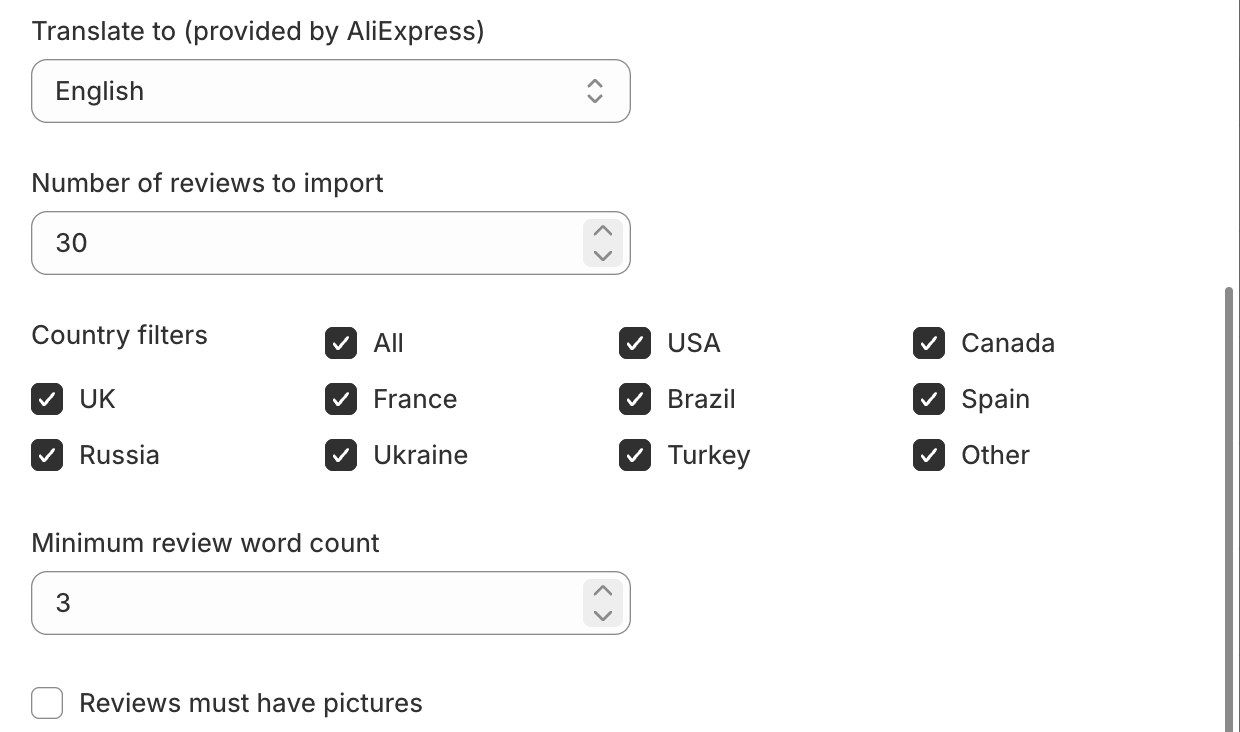
- Translate to. Pick your store's language. Translation is done by AliExpress (Judge.me Help Center), and our English results read naturally.
- Minimum review word count. Set it to 3 or more. At 0, Judge.me imports star-only ratings and fills the body with your product title (Judge.me Help Center), which reads like a fake review.
- Countries. Keep the countries you sell to. Reviews about delivery to Brazil don't help a shopper in Texas.
- Reviews must have pictures. Turn it on only if the listing has plenty of photo reviews. Our listing had 18 photo reviews out of 210 ratings, so this filter would have cut the import to a handful.
There was no minimum star rating filter in the single-product dialog when we tested. That's the honest default: importing only five-star reviews would show shoppers a better rating than the product has on AliExpress.
Method 2: Import with Loox
Loox imports AliExpress reviews with a bookmark button instead of a URL field (Loox Help Center):
- In Loox, go to Manage Reviews > Import reviews and choose AliExpress.
- Drag the Import to Loox button to your browser's bookmarks bar.
- Open the AliExpress product page and click the bookmark.
- Choose the Shopify product, the number of reviews, a minimum rating and translation, then click Preview & import.
Loox's Beginner plan imports up to 20 reviews per import and Convert up to 100. Each review brings one image, and Loox shows reviewer names as initials such as "J. S." because AliExpress hides full names. Loox does offer a minimum rating filter, so leave it at 1 star to keep the mix honest.
Method 3: Export a CSV and import it into any review app
If your review app has no AliExpress importer, use a free importer that exports a CSV, then load the file with your review app's CSV import.
- Install an importer with CSV export, such as Judge.me Ali Reviews Importer, Trustoo Ali Reviews Importer or Ryviu: AliExpress Reviews.
- Import the reviews for each product as above.
- Export the CSV and open it in a spreadsheet.
- Clean it up in the sheet: replace invented names, delete duplicate rows and seller or delivery comments (the checklist in the next section shows what to look for), and add a column or tag for the source if your app supports one.
- Match the columns to your review app's template and import it. The spreadsheet route is also how Loox handles sources it doesn't support directly (Loox Help Center).
The spreadsheet step is where this method beats the others. You see every review in one place, so finding duplicates takes a minute. If you're new to spreadsheet imports, our guide to bulk editing Shopify products with CSV covers the basics of working with exported files.
Clean up imported reviews before they go live
Whichever method you use, read every review before customers see it. This is what we found when we asked Judge.me for 30 reviews with at least 3 words. We got exactly 30, then read each one.
The reviewer names were made up. AliExpress shows masked names such as "A***a" or just "AliExpress Shopper". In the importer, every review had a full name instead. The review AliExpress lists under "AliExpress Shopper" on July 3, 2026 ("These are the best bracelets I have ever bought, I have all the colors…") came in as "Fae Collins". Showing a made-up name next to a real review can suggest a specific person, maybe one of your customers, wrote it. The FTC rule covers reviews that misrepresent whether the reviewer exists, and an invented name edges toward that (16 CFR 465.2). Edit the names to initials or "AliExpress buyer" before you publish.
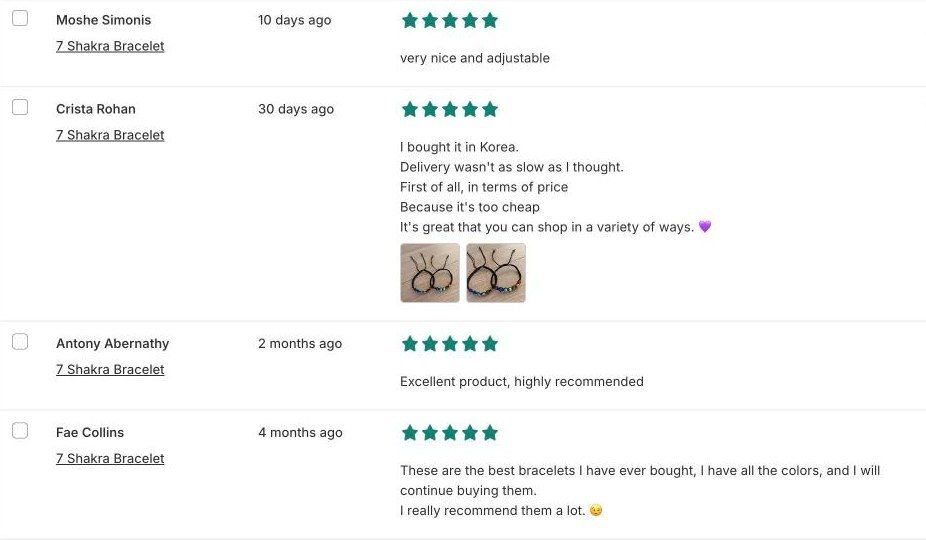
One buyer became two people. On the AliExpress listing, the review "I buy them as gifts…" from "A***a" on December 12, 2025 appears twice, once tagged Navy Blue and once Red. The importer turned the two copies into separate people: "I buy them as gifts and they are very easy to put on…" appears under both "Brock McCullough" and "Evelynn West", with the same photo. A second review, "Just as seen in the photo", was also imported twice under two names. Delete one of each pair.
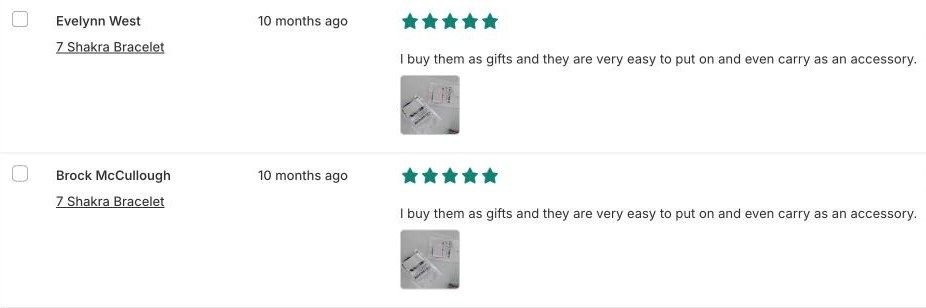
Some reviews are about the AliExpress seller, not the product. Four of the 30 praised the seller or the delivery, for example "I bought it in Korea. Delivery wasn't as slow as I thought" and "Very nice …. Seller very good". Your shipping times and service are different, so those lines tell your shoppers something that isn't true for your store. Delete them rather than rewriting them.
Almost all were five stars. 28 of the 30 had five stars and the other two had four, close to the listing's 4.8 average. One five-star review says the bracelet "started to come apart" in less than a week. Keep reviews like that. They're honest, and changing a review's text or rating would misrepresent the reviewer's experience, which is what the FTC rule is aimed at. The same goes for AI "rewrite reviews" features some importers now offer: translating is fine, rewriting isn't.
After that cleanup you'd have about 24 usable reviews out of 30. Notice that every deletion rule here (duplicates, comments about another seller) applies regardless of whether the review is positive or negative. That's the line to hold.
Say where the reviews came from
We didn't find a per-review "imported" badge in Judge.me's widget settings. The simplest fix works with any review app: add a short note above the review widget on your product template in Online Store > Themes > Customize, using a text block. Something like "Some reviews are imported from AliExpress buyers of this exact product. AliExpress marks them as verified purchases; we don't verify them further." Judge.me itself says imported reviews "do not demonstrate a purchase from your own store" and aren't marked as verified (Judge.me), so don't add a verified badge yourself.
Keep imported reviews out of Google's stars
Judge.me's Google Shopping sync already excludes reviews imported from AliExpress (Judge.me Help Center), so the Merchant Center side is handled. Product-page markup is different. Judge.me adds review snippets to product pages by default for any product with published reviews (Judge.me Help Center), and its documentation doesn't describe a way to leave imported reviews out.
That leaves a trade-off. While any imported reviews are published, turn the markup off in Judge.me > Settings > Google, SEO and AI > SEO Rich Snippets by unchecking Add microdata snippets and Add JSON-LD snippets. Turn it back on after you've deleted the imported reviews, for example once each product has enough reviews from your own customers. The setting is store-wide, so you'll lose search stars for your genuine reviews too while it's off. Then run a product URL through Google's Rich Results Test to confirm no review rating remains, because some themes output their own rating markup.
After the import: replace them with your own reviews
Treat imported reviews as a starting point. Reviews from your own customers are better in every way that matters here. They describe your shipping and packaging, they can carry a "verified buyer" badge, and Google accepts them for Shopping product ratings.
- Turn on review request emails in your review app so every order gets asked for a review.
- Turn off weekly auto-import once a product has its own reviews. Judge.me's auto-import keeps adding AliExpress reviews every week (Judge.me Help Center), and each batch needs the same cleanup.
- Delete imported reviews when you change supplier, because the new supplier's product isn't the one those buyers reviewed.
- Keep the source note above the widget while any imported reviews remain.
Reviews are only one trust signal. If product pages still don't convert, our guide on why a Shopify conversion rate is low walks through the other common causes. Supplier products also sell out without warning, and Redsun's Out of Stocks Manager moves sold-out products to the bottom of collections, so shoppers browsing from a well-reviewed product don't land on a collection topped by items they can't buy.
AliExpress review import FAQs
Can I import AliExpress reviews to Shopify for free?
Yes. The Judge.me Ali Reviews Importer is free with unlimited imports, and Judge.me Product Reviews shows them for free. Trustoo's importer is also free, and Loox's free plan imports up to 20 reviews at a time.
Will imported AliExpress reviews show as stars in Google?
They shouldn't. Google's review snippet guidelines say not to aggregate reviews from other websites, and Merchant Center only accepts reviews you collected yourself. Judge.me leaves AliExpress imports out of its Google Shopping sync, but its docs describe no way to leave imported reviews out of product-page markup, so turn that off while any imported reviews are published.
Do imported reviews show in the Shop app?
Not through Judge.me. Its Shop integration excludes imported reviews and only sends reviews that meet Shop's conditions (Judge.me).
Can I edit imported reviews?
Edit the reviewer name to initials or "AliExpress buyer", and delete reviews that are duplicates or about the seller. Don't rewrite the text or change the star rating, because the review would no longer reflect what the buyer said.
Can I import reviews from Amazon, Temu or Etsy too?
Some apps can. Ali Reviews imports from Amazon, eBay, Temu and Etsy on paid plans, and Trustoo's importer covers Shopee, DSers and Etsy. The same rules apply: same product, labeled source, no cherry-picking.
Quick checklist for imported reviews
Importing AliExpress reviews into Shopify is quick with any of these apps. The work is in what happens next:
- Paste the exact AliExpress listing you order from instead of trusting auto-match.
- Read every imported review. Replace invented names, delete duplicates and remove comments about the AliExpress seller.
- Add a note saying where the reviews came from, and keep the low ratings.
- Turn off review markup while any imported reviews are published, and replace them with your own customers' reviews as orders come in.
If you're also working on how AI shopping assistants see your products, our guide to GEO and AEO for Shopify explains how reviews and product data feed into AI answers.