Redsun Out of Stock Manager for Shopify: Push Down, Hide and Alert on Sold-Out Products
By Thomas Vu · Published · Updated
Redsun: Out of Stock Manager is a Shopify app that handles sold-out products for you. It moves them to the bottom of your collections, or hides them and redirects their pages, and it emails you when products drop below a stock level you set. Push down and hide run automatically as stock changes, and alerts arrive on a schedule you choose. This guide explains what each feature does, when to push down and when to hide, how to set it up and what it costs.
We make this app, so we've kept the guide to what it actually does, and included when you don't need it.
Key takeaways
- Out-of-stock items send shoppers elsewhere. In an AlixPartners survey of 9,000 US fashion shoppers, two-thirds said they'd buy from another retailer when the item they wanted was out of stock (AlixPartners, 2024).
- Shopify can't sort collections by stock on its own. Its collection sort options are best selling, alphabetical, price, date or manual, so a sold-out product keeps its place.
- Push down for short stockouts, hide for long ones. Push down keeps the product page live. Hide and redirect suits products that are away for a month or more and will come back.
- Alerts help you avoid stockouts. A low-stock email gives you time to reorder before a best-seller sells out.
- There's a free plan for up to 50 products. Paid plans start at $3.99 a month.
Why sold-out products hurt your store
When the item a shopper wants is out of stock, many go elsewhere. AlixPartners found that two-thirds of shoppers say they'd switch to another retailer in that situation (AlixPartners, 2024). That's stated intent in a survey, and real behavior varies, but it shows how much rides on what a shopper sees in stock.
Where sold-out products sit makes it worse. If the first products in a collection are sold out, the in-stock alternatives that might keep a shopper are further down the page. Your best-sellers are often the first to sell out, so a collection sorted by "Best selling" can put sold-out products right at the top.
Shopify doesn't fix this for you in collections. A collection sorts by best selling, title, price, date or a manual order you set, and none of these look at stock. Shopify's Search & Discovery app can show out-of-stock products last, but Shopify documents that setting for search and predictive search results only (Shopify Help Center).
You can fix it by hand: re-sort collections whenever stock changes, or unpublish products as they sell out. That works for a small catalog and becomes a daily chore for a large one. For every method, including theme settings, automated collections, code and apps, see our guide on how to hide sold out products on Shopify.
What the app does
The app has three features. Use any of them alone or together.
Feature | What it does | Best for |
|---|---|---|
Push down | Moves sold-out products to the bottom of each collection, as stock changes | Stockouts of up to about four weeks |
Hide and redirect | Hides sold-out products and sends anyone who opens their page somewhere useful | Products away for a month or more that will return |
Alerts | Emails a list of out-of-stock and low-stock products, on your schedule | Reordering before you run out |
Most stores start with push down and alerts, then add hiding for products that will be gone for a long time. All three features are included on every plan, including the free one.
Push down: keep sold-out products, but move them out of the way
Turn on push down for a collection and the app reorders it so in-stock products come first and sold-out products go to the end. When a product sells out, it moves down straight away. When it's back in stock, it returns to its normal place.
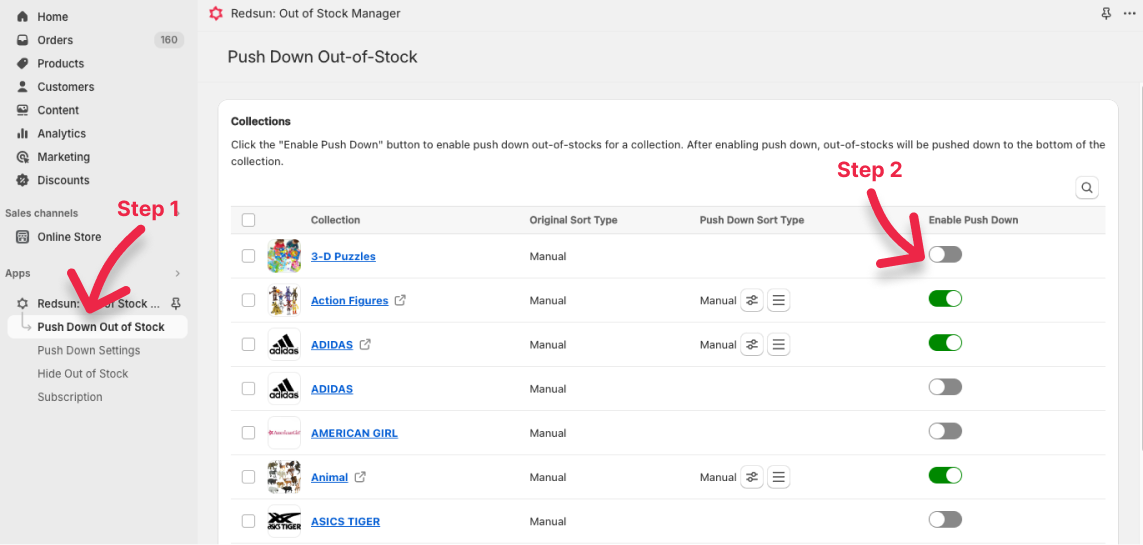
The push down setup guide walks through these steps.
Say a 24-product collection sorted by best selling has its three top sellers sold out, so they fill the first three positions. With push down on, those three move to positions 22 to 24, and the first row shows products a shopper can buy today.
You choose how the rest of the collection is ordered. The app has ten sort types: best selling, title A to Z or Z to A, price high to low or low to high, created date in either order, published date in either order, and manual. With manual, you drag products into place, and sold-out products still go to the bottom (how to change the push down sort type).
Push down is the safer default. The product stays visible and its page stays live, so shoppers can still find it, sign up for restock emails if you use a back-in-stock app, and buy it again the moment it's back.
Hide and redirect: take sold-out products off the storefront
Hiding removes sold-out products from your storefront until they're back in stock, then shows them again automatically (how to hide out-of-stock products).
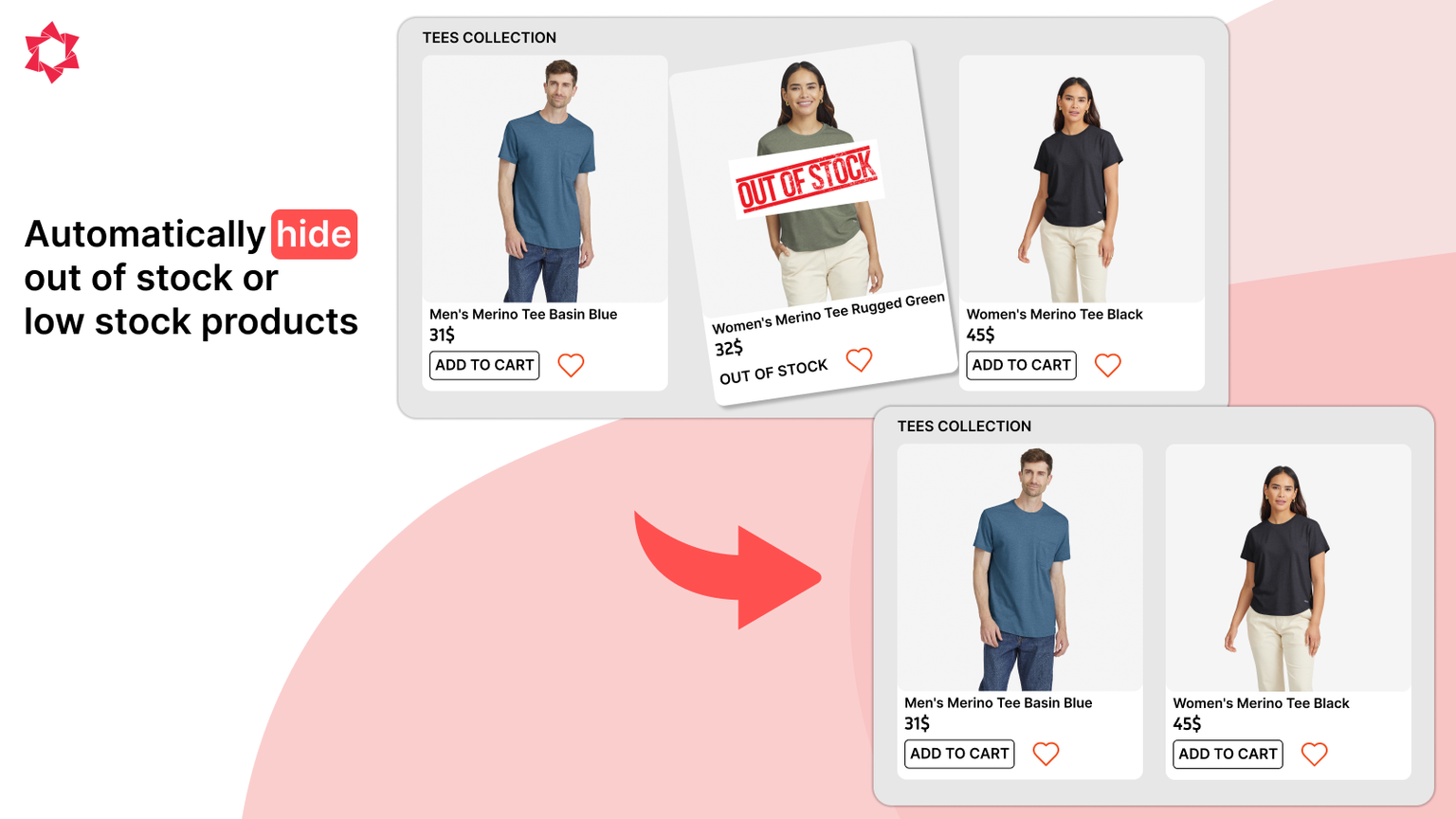
A few settings make hiding safer:
- Delay: hide a product only after it has been sold out for a set number of days, so a quick restock doesn't make it disappear.
- Channels: hide sold-out products on specific sales channels only.
- Tags: tag hidden products, so you can find them in your admin.
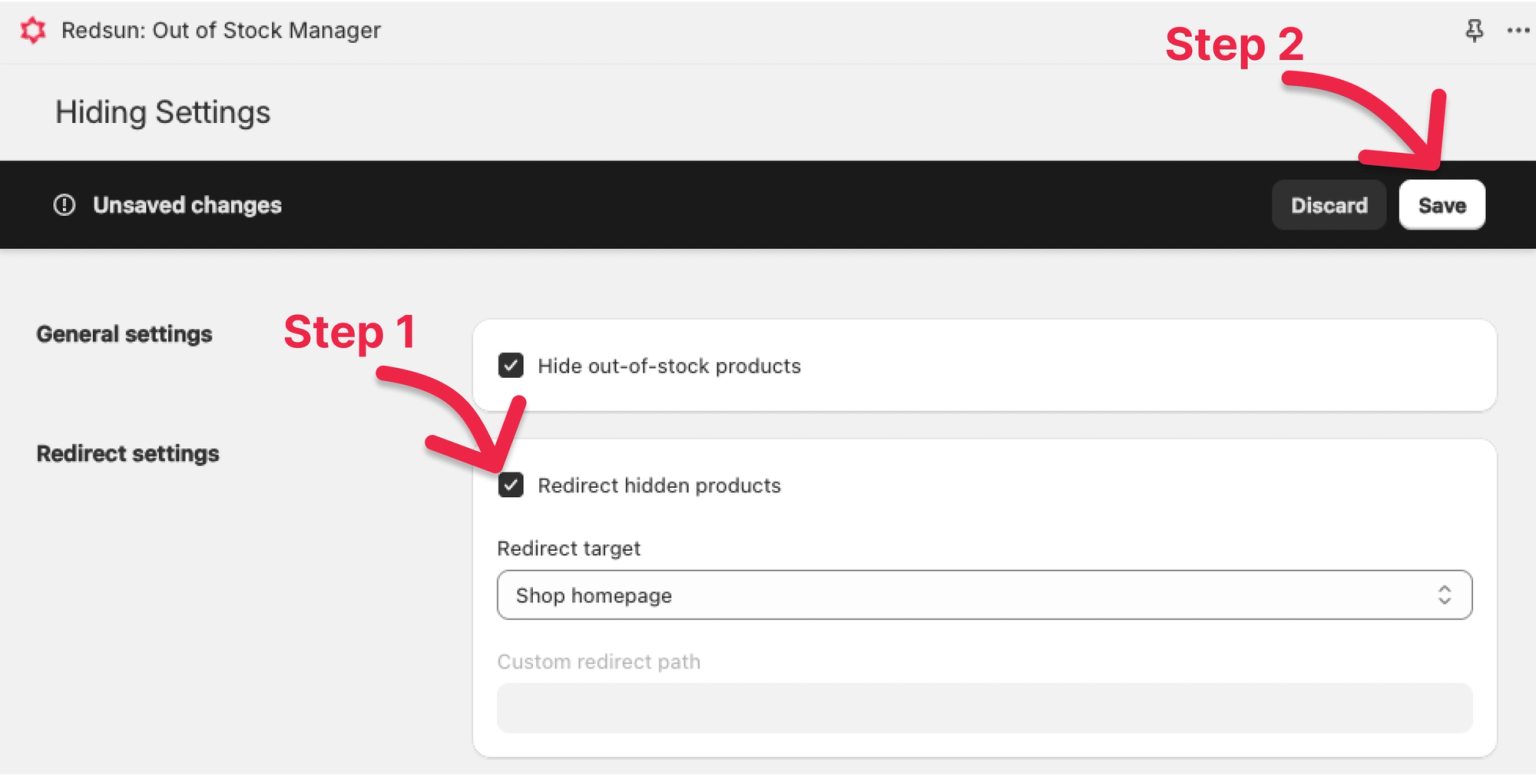
A hidden product's page is a dead end for anyone who follows an old link or a search result. The redirect option fixes that. You choose where those visitors go: your home page, a collection, a product, a random collection that contains the hidden product, or a custom path (how to redirect hidden products). A related collection gives them somewhere to keep shopping.
Push down or hide: which should you use?
Use push down unless you have a reason to hide. The main difference is what happens to the product page.
Push down | Hide and redirect | |
|---|---|---|
Product page | Stays live | Visitors are redirected |
Shopper sees the product | Yes, at the end of the collection | No, until it's back in stock |
Search engines | Can keep the page indexed | Can drop the page while it's hidden |
Best for | Back within about four weeks | Away for a month or more, then back |
Risk | Shoppers scroll past sold-out items | Losing a page that ranks well |
The search engine row matters. In 2022, Google's John Mueller said a page marked out of stock may be treated like a soft 404 and dropped from results, but that a page with a lot of useful product information can stay relevant, and that one product selling out doesn't affect the rest of the site's rankings (Search Engine Journal). So keep pages live for products you'll restock soon, and save hiding for longer gaps.
For products that are discontinued for good, archive them in Shopify and add a URL redirect to a related collection. Or use hide and redirect if you'd rather not manage redirects by hand.
Alerts: reorder before best-sellers sell out
The best sold-out product is one that never sells out. The alert feature emails you a list of products that are out of stock or below a threshold you set, on a schedule you choose (how to set up out-of-stock alerts).
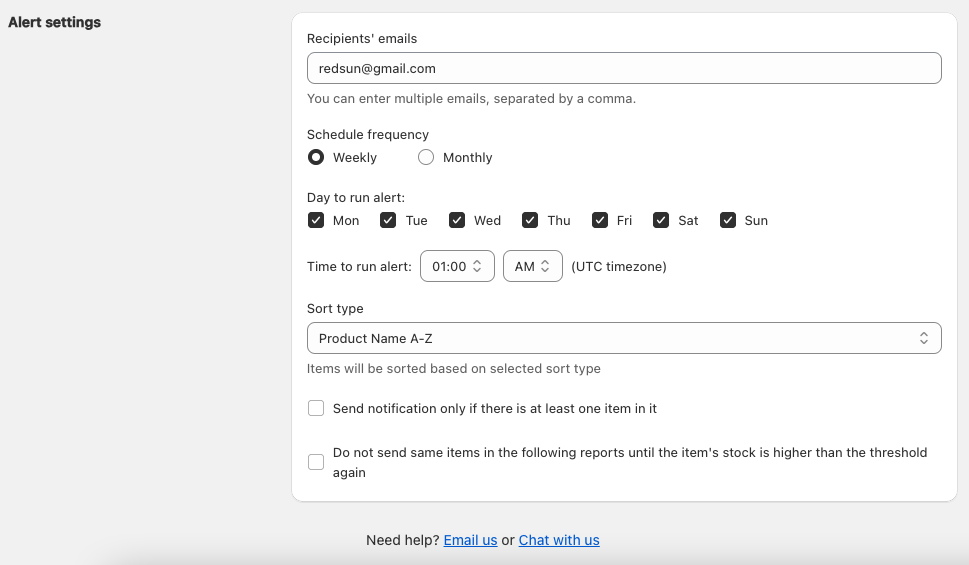
You can set:
- The threshold: per variant or for the whole product.
- Which stock counts: filter by location, and include or exclude products set to keep selling when out of stock.
- Who gets the email: several addresses, separated by commas.
- When it arrives: chosen days of the week or month, at a set time (UTC).
- When to stay quiet: skip empty reports, and leave out items you've already been told about until their stock rises above the threshold again.
A weekly low-stock email to whoever places supplier orders is usually enough for a small store. During busy periods such as Black Friday and Cyber Monday, a daily alert is worth turning on.
How to set it up
Setup takes a few minutes and needs no code.
- Install the app from the Shopify App Store and open it from your Shopify admin.
- Open Push Down Out of Stock and enable it for your main collections, or select several and enable them together.
- Pick a sort type for each collection, or keep the current one.
- Open Hide Out of Stock if you also want to hide products, set a delay and turn on redirects.
- Open Alert, add your email, then choose a threshold and schedule. The first alert is sent as soon as you save.
The first pass can take a few minutes on a large catalog. After that, push down and hide follow your stock as it changes.
Pricing
Every plan includes push down, hide and redirect, and alerts. Paid plans come with a 14-day free trial.
Plan | Price | Products | Collections |
|---|---|---|---|
Basic | Free | Up to 50 | Up to 100 |
Standard | $3.99/month or $35.88/year | Up to 500 | Up to 100 |
Advance | $7.99/month or $71.88/year | Up to 10,000 | Up to 300 |
Premium | $15.99/month or $143.88/year | Up to 100,000 | Up to 5,000 |
Prices are from the App Store listing as of October 2026, and our pricing page compares plans. Check the listing for current prices.
What merchants say
As of October 2026, the app has a 5.0 rating from two reviews on the Shopify App Store. One, from Swiss store Tabita Bags with Love in February 2024 after five months of use, reports saving "hours every month" and a 15% increase in conversion. That's one store's experience, not a typical result. Your outcome depends on how many products you have, how often they sell out and where they sit in your collections.
When you don't need this app
- Your catalog is small and rarely sells out. Re-sorting a few collections by hand is free.
- You're happy with a free workaround. An automated collection with the condition "Inventory stock is greater than 0" only shows in-stock products, and Shopify Flow can unpublish products when their stock hits zero. Both take setup, and neither moves sold-out products to the bottom.
- Shoppers mostly use search, not collections. Shopify Search & Discovery can already place sold-out products last in search results.
- You discontinue a few products a month and never restock them. Archiving them and adding URL redirects in Shopify does the same job for free.
The app also doesn't email shoppers when products are back in stock. For that, you need a separate back-in-stock app.
If sold-out products show up in your collections every week, the app saves you that manual work.
FAQ
Does hiding sold-out products hurt SEO?
It can, if the product ranks well and will come back. A hidden page can drop out of search results once Google recrawls it. For products you'll restock within a few weeks, use push down so the page stays live. For longer gaps, hide the product and redirect visitors to a related collection.
What happens when a product is back in stock?
Redsun: Out of Stock Manager reverses its change automatically. A pushed-down product returns to its normal place in the collection, and a hidden product is shown again.
Does it work with manual collection sorting?
Yes. Set the collection's push down sort type to manual and drag products into the order you want. Sold-out products still move to the bottom.
Can I hide products only on some sales channels?
Yes. You can choose the channels where sold-out products are hidden, and tag hidden products so they're easy to find in your admin.
Is there a free plan?
Yes. The Basic plan is free for up to 50 products and 100 collections, with every feature included.