How to Fix Duplicate Content on Shopify (and What Shopify Already Fixes for You)
By Thomas Vu · Published
Duplicate content on Shopify means the same product, collection or article can be reached at more than one URL, or the same text appears on more than one page. Every Shopify store has some, because the platform builds extra URLs for collections, variants, sorting and filters. Most of it is handled for you by canonical tags. The part that isn't comes from tag pages, vendor pages, duplicate products, extra domains and copied descriptions.
This guide shows which duplicates Shopify already handles, based on a check of 10 URL patterns on a live Shopify store. Then it walks through how to find the rest in Google Search Console and the five fixes that clean them up, with the exact admin paths and theme code.
Key takeaways
- There is no duplicate content penalty for normal store URLs. Google says some duplicate content on a site is normal and not a violation of its spam policies (Google Search Central). The cost is split signals, wasted crawling and the wrong URL showing in search.
- Shopify already canonicalizes the big ones. Collection product paths,
?variant=URLs, sort orders and single filters all point their canonical tag back to the main product or collection URL. - Tag pages and vendor pages are the gap. They canonicalize to themselves, so each one can be indexed as its own thin copy of a collection.
- Fix with the right signal. Use a 301 redirect for duplicates you retire, the canonical tag for duplicates that must stay live, and
noindexonly for listing pages you never want in search. - Check Search Console first. The Page indexing report tells you which duplicates Google actually found, so you fix real problems instead of theoretical ones.
Why duplicate content matters for Shopify SEO
When several URLs show the same content, Google groups them, picks one as the canonical and treats the others as duplicates. Google crawls the canonical page most regularly and uses it as the main source to evaluate content and quality (Google Search Central). If you don't say which URL you prefer, Google picks the version it considers best (Google Search Central).
That's why duplicate content is a ranking problem, not a penalty problem. You lose out in three ways:
- Signals split. Link signals spread across several URLs instead of building up on one.
- Crawling gets wasted. Googlebot spends visits on filter, tag and vendor variations instead of your new products.
- The wrong URL shows up. A collection path, a tag page or an old duplicate product ranks instead of the page you optimized.
The same applies to AI search. AI features that draw on Google's index, such as AI Overviews, start from the pages Google indexes, so a clean canonical setup makes it more likely the right URL gets quoted. Our guide to GEO and AEO for Shopify covers the rest of that picture.
Where Shopify creates duplicate URLs: our 10-URL test
We requested 10 URL patterns on Shopify's public Dawn demo store (theme-dawn-demo.myshopify.com) on October 18, 2026 and recorded the canonical tag each one returned. Here's what Shopify does out of the box.
URL pattern | Example | Canonical tag points to | Action needed? |
|---|---|---|---|
Product URL |
| Itself | None |
Product inside a collection |
|
| Only if your theme links to it (Fix 1) |
Variant |
|
| None |
Alternate template |
|
| None |
Sorted collection |
|
| None (also blocked in robots.txt) |
Filtered collection |
|
| None |
Paginated collection |
| Itself | None, this is correct |
Collection tag page |
| Itself | Yes (Fix 2) |
Vendor page |
| Itself | Yes (Fix 2) |
Markets subfolder |
| Itself, with hreflang tags | Only if content is identical (Fix 4) |
What Shopify already fixes for you, and what it doesn't
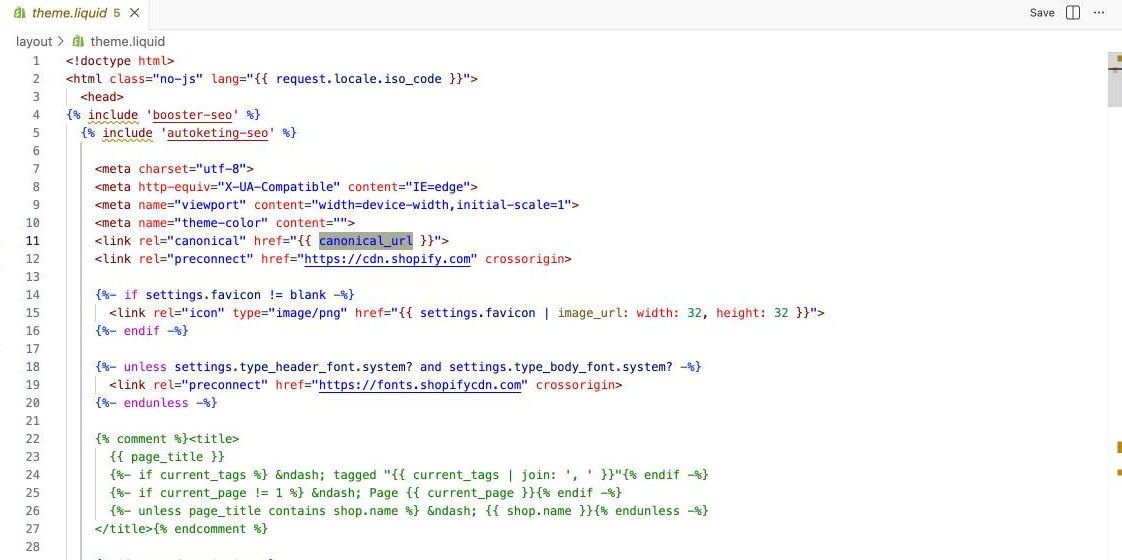
Shopify handles more than most duplicate content guides give it credit for. Dawn and other current Shopify themes print a canonical tag in the page head using the canonical_url Liquid object, which returns the canonical URL for the current page (Shopify Liquid reference). Our test used Dawn, so check a third-party theme with step 3 in the next section. In our test, that tag stripped variant IDs, sort orders, single filters and the collection path from product URLs.
Shopify's default robots.txt also keeps crawlers away from the noisiest URLs. On a live Shopify store we checked, the generated file blocks sorted collection URLs (/collections/*sort_by*), combined tag URLs (/collections/*+*), collection URLs with two or more filters, on-site search (/search) and theme preview links. You can extend those rules with a robots.txt.liquid template (Shopify Dev Docs).
What Shopify does not handle:
- Tag pages like
/collections/shirts/linencanonicalize to themselves, so Google can index each one as a near copy of the collection. - Vendor and type pages like
/collections/vendors?q=brandalso canonicalize to themselves, and often repeat a real brand collection. - Internal links that point to collection paths. The canonical is right, but the links send mixed signals (Fix 1).
- Anything you create: duplicate products, copied descriptions, extra domains and repeated titles.
How to find duplicate content on your Shopify store
Start with the data Google already has, then confirm with your own checks.
- Open the Page indexing report. In Google Search Console, go to Indexing > Pages and look under "Why pages aren't indexed" for the duplicate statuses (Search Console Help):
- Duplicate without user-selected canonical: Google found a duplicate with no canonical declared and picked another page. This is uncommon on Shopify, because themes print a canonical tag on every page. If you see it, check app-generated pages and any theme that is missing the tag.
- Duplicate, Google chose different canonical than user: you declared a canonical but Google disagreed. On Shopify, tag and vendor pages often land here, because they name themselves as canonical while Google sees them as copies of a collection.
- Alternate page with proper canonical tag: working as intended. Collection paths and variant URLs land here, and Google says there is nothing you need to do. You'll also see URLs with parameters such as _pos, _sid and _ss from search results, or pr_prod_strat from product recommendations. In our test, both kinds canonicalized to the clean product URL.
- Inspect a URL. Paste a product URL into the URL Inspection tool and compare User-declared canonical with Google-selected canonical. Google notes that the live test doesn't check duplicate or canonical conditions, so read the indexed result.
- View the page source. Open a product, collection and tag page, press Ctrl+U (Cmd+Option+U on a Mac) and search for
rel="canonical". Each page should have exactly one. - Search Google for a product title in quotes. If two of your URLs come back for the same product, you have a duplicate to merge.
Fix 1: Point internal links at the canonical URL
Google's advice is to link internally to the canonical URL, not to a duplicate (Google Search Central). On Shopify, the usual culprit is the within: collection Liquid filter, which turns a product link into /collections/bags/products/studio-denim. Shopify's own docs note that this shows identical content at two URLs and tell you to consider the SEO implications before using it (Shopify Liquid reference).
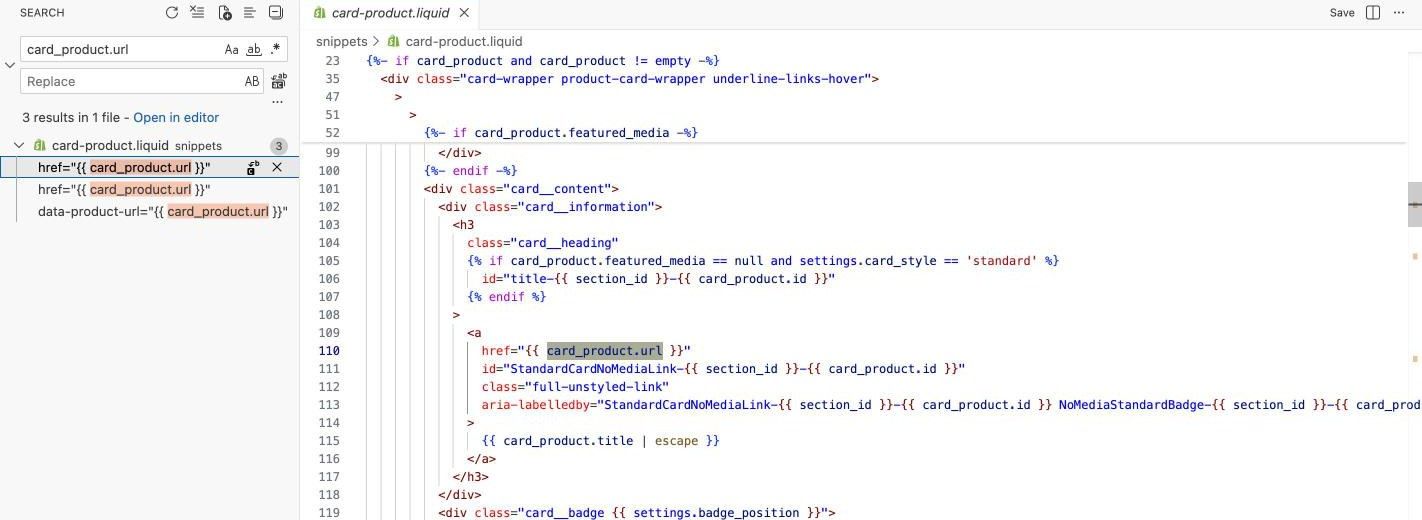
To check your theme:
- Go to Online Store > Themes, click the ⋯ button next to your live theme and choose Edit code.
- Open the search panel and search for
within:(some themes leave out the space). - If you find it, delete the filter so the link reads
{{ product.url }}(or{{ card_product.url }}in newer themes). Test on a duplicate theme first.
What we saw on our own store: our dev store runs Dawn. The search for within: collection returned nothing, and Dawn's product cards already link to the plain /products/ URL. Older themes and some third-party themes still use the filter, so it's worth the two-minute check. The same search for canonical_url turned up 7 files, including snippets added by SEO apps, which is a good reminder to confirm the rendered page still has only one canonical tag after you install or remove an app.
Fix 2: Keep tag, vendor and filter pages out of the index
Tag pages and vendor pages rarely deserve to rank on their own. Google's ecommerce guidance is to use a noindex robots meta tag or robots.txt for filtered list variations you don't want crawled or indexed (Google Search Central).
Add this line inside the <head> of layout/theme.liquid, just below the canonical tag:
{% if current_tags or request.path contains '/collections/vendors' or request.path contains '/collections/types' %}<meta name="robots" content="noindex, follow">{% endif %}
The current_tags check covers both collection tag pages and blog tag pages such as /blogs/news/tagged/style. Test it on a duplicate theme first, and note that the path check also matches a real collection whose handle starts with vendors or types. Make sure your products are also linked from collections and menus, since Google may crawl long-term noindexed pages less often.
Two exceptions:
- If a tag or vendor page earns real search traffic, turn it into a proper collection with its own title and description instead of hiding it. Our guide to optimizing a Shopify collection page covers what to put on it.
- Single filter URLs already canonicalize to the collection. If Search Console shows Google crawling thousands of them, add a rule in
robots.txt.liquid. Google says robots.txt is generally more effective long term than a canonical for filter URLs you don't need in search (Google Search Central).
Fix 3: Merge duplicate products and rewrite copied descriptions
Duplicate products are the duplicates you create yourself. Common causes are listing each color as its own product, duplicating a product for a sale, or re-creating a product when it comes back in stock. Each copy gets its own URL, and Google has to pick one.
To merge them:
- Keep the product with the most sales history and links, and add the others as variants of it.
- Delete the extra products or set them to Draft. Draft products return a 404 on your storefront.
- Go to Content > Menus, click URL redirects, then Create URL redirect, and send each old product URL to the one you kept. For many products, use Import with a CSV.
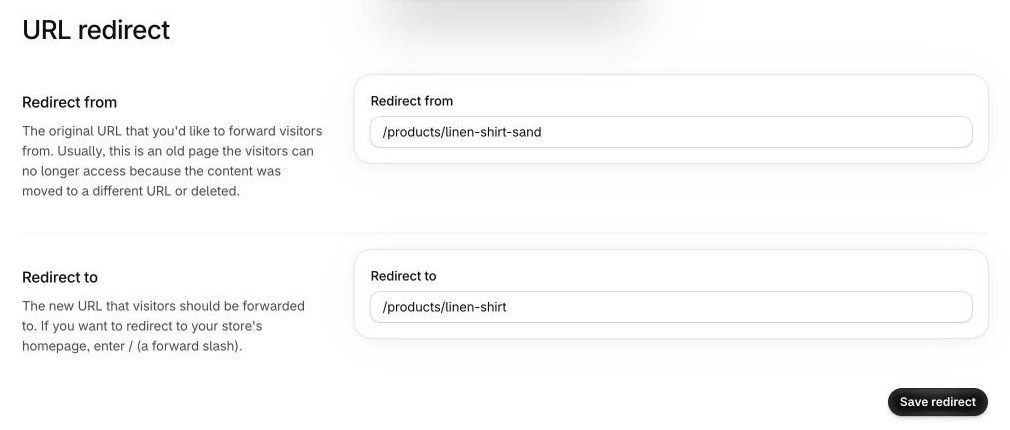
Shopify only runs a redirect when the old URL returns a 404, so remove or unpublish the duplicate first. Stores can have up to 100,000 redirects, or 20 million on Plus (Shopify Help Center). A 301 redirect is the strongest way to retire a duplicate, because Google treats the target as the new canonical (Google Search Central).
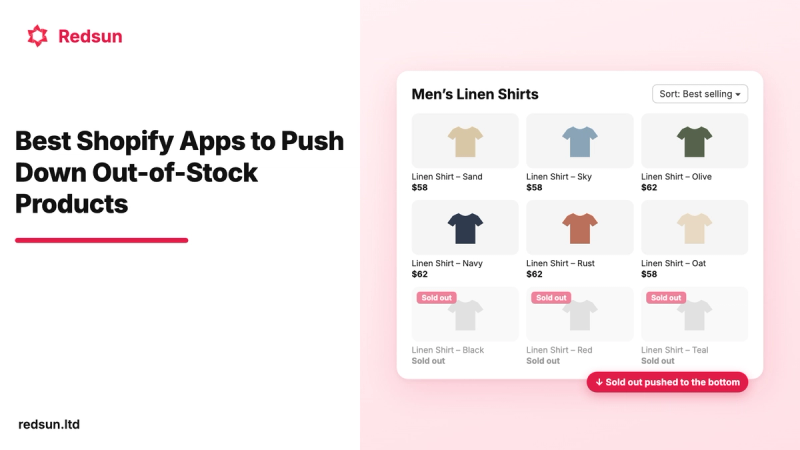
Sold-out products cause a lot of these copies. Keep the original URL live while you restock, so it keeps its rankings and links. If you don't want sold-out items at the top of your collections in the meantime, our app Out of Stocks Manager pushes them to the bottom in real time and brings them back up as soon as they're in stock. Our guide on keeping, hiding or redirecting out-of-stock products covers the SEO side.
Copied manufacturer descriptions are a cross-site duplicate. Google won't penalize you for them, but if many stores use the same text, Google tends to show one version and filter the rest, the same way it groups duplicates on one site (Google Search Central). Rewrite your best sellers first with details only you know: fit notes, materials, care, who it's for and photos you shot.
Fix 4: Use one domain and set up Markets correctly
Every domain that loads your store is another full copy of it. In Settings > Domains, choose your primary domain and redirect the others to it (Shopify Help Center). Then type the http://, www and non-www versions into your browser and confirm each one lands on the same address.
Shopify Markets adds subfolders such as /en-fr/ with their own URLs. In our test, Shopify gave each one a self-referencing canonical plus hreflang tags linking the language and region versions. Google lists same-language region versions, such as US and UK pages, as a common type of duplicate and prefers URLs in hreflang clusters when choosing canonicals (Google Search Central). Give each market a real difference, such as local currency, shipping details or translated content, and don't open markets you don't sell to.
Fix 5: Give every page a unique title and meta description
Duplicate titles and meta descriptions don't create duplicate URLs, but they make pages look the same in search results. Dawn adds "tagged" and "Page 2" to the title of tag and paginated pages, which helps. On our dev store, an SEO app had commented out that title code (lines 22 to 27 in the screenshot above) and took over the title, so check that your tag and paginated pages still get distinct titles after you install one. Products created from a template or an import often still share the same description.
Edit them under Search engine listing on each product or collection. For more than a handful, the bulk editor and CSV export are faster, as shown in our guide to bulk editing Shopify products.
Duplicate content myths to skip
Some common advice makes things worse. Google's documentation contradicts all of these:
- "Canonical page 2 to page 1." Google says not to use the first page of a paginated sequence as the canonical. Each page should keep its own (Google Search Central). Shopify already does this.
- "Noindex the duplicates." Google doesn't recommend
noindexto choose a canonical within a site, because it removes the page from search entirely (Google Search Central). Use it only for pages you never want indexed, like the tag pages in Fix 2. - "Block duplicates in robots.txt." Google says not to use robots.txt for canonicalization (Google Search Central). A blocked URL can't be crawled, so Google never sees its canonical tag.
- "Install an app to add canonical tags." Your theme already has one. A second tag from an app can conflict with it, and Google advises against giving different canonicals for the same page.
Frequently asked questions
Does Google penalize Shopify stores for duplicate content?
No. Google says some duplicate content on a site is normal and not a spam violation. It picks one URL to show and filters the rest. Google's spam policies target scraped content copied from other sites without adding value, not the extra URLs Shopify creates.
Should I remove /collections/ from Shopify product URLs?
You can't change the URL structure, and you don't need to. The collection path already canonicalizes to /products/. What you can change is your theme's internal links, by removing the within: collection filter if your theme uses it.
Do I need an SEO app to fix canonical tags on Shopify?
Usually not. Dawn and other current Shopify themes print a canonical tag on every page, and in our test it handled every product and collection variation correctly. An app is only worth it if it solves a specific gap, and you should check that it doesn't add a second canonical tag.
How long does it take for Google to drop duplicate URLs?
It depends on how often Google crawls your store. Redirected and canonicalized URLs drop out as Google recrawls them, which can take a few weeks on a small store. Track progress in the Page indexing report rather than with site: searches.
Should I redirect or delete duplicate products?
Redirect them. Deleting a product without a redirect leaves a 404 that loses any links and rankings the URL had. Delete or unpublish the duplicate, then add a URL redirect to the product you kept.
Clean up the duplicates that matter
You don't need to chase every extra URL Shopify creates. Its canonical tags already handle collection paths, variants, sorting and filters. Spend your time on the duplicates Google actually reports: tag and vendor pages, duplicate products, extra domains and copied descriptions.
Start with the Page indexing report in Search Console, fix the statuses that show real duplicates, and recheck in a month. Then make your collection pages worth ranking with our Shopify collection page optimization guide.