Shopify AEO and GEO Checklist: 32 Checks to Get Your Store Into AI Answers
By Thomas Vu · Published
To get a Shopify store into ChatGPT, Copilot, Gemini and Google's AI answers, work through seven areas in this order: access, product data, price and stock, structured data, pages, reviews and measurement. This checklist breaks them into 32 checks. Each one says where to look in your admin and what a pass looks like.
If you want the background first, our guide to GEO and AEO for Shopify in 2026 explains how AI assistants pick products and which tactics to ignore. This post is the hands-on part: open your admin in another tab and work down the list. We ran several of the checks on Shopify's public Dawn and Horizon demo stores and on our own development store on October 21, 2026, and the results are included below.
Key takeaways
- Start in Sales channels > Agentic. If Shopify Catalog shows "Ineligible", channels fed by Catalog, such as ChatGPT and Copilot product cards, won't list your products. Our password-protected development store showed exactly that.
- Set a product category on every product. Shopify Catalog excludes products it classifies as Uncategorized (Shopify Help Center).
- Fill in your store policies. ChatGPT through Shopify Catalog needs your terms of service, privacy policy and refund policy completed in the admin (Shopify Help Center).
- You don't need to buy an llms.txt file. Every Shopify Online Store we tested already serves
/llms.txtand/agents.md, and Google says its search ignores them. - Check that Search Console is set to Include. Google says a site must be included in Search generative AI features in Search Console to appear in AI Overviews and AI Mode (Google Search Central).
How to use this checklist
Score each check as pass, fail or not applicable. Fix the fails in section order, because the first sections decide whether AI channels can see your products at all. The later sections decide how well your products compete once they're seen.
AI gets your store's data in three ways, and each section of the checklist covers one or more of them.
1. Access: can AI channels reach your store?
These six checks decide whether your products can show up at all. Do them first.
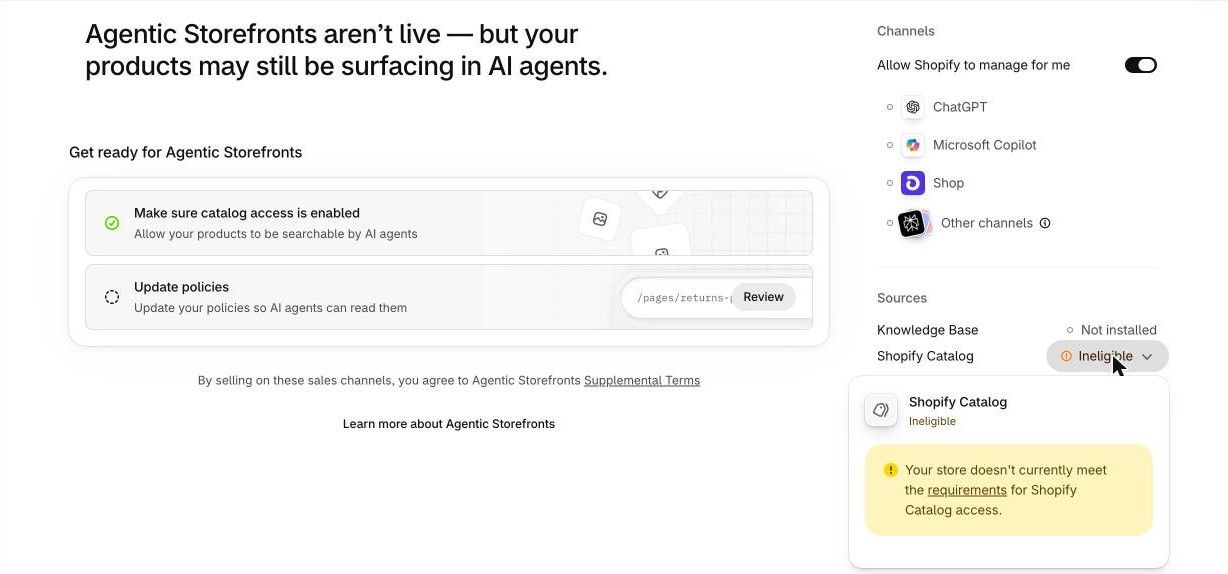
- 1. Shopify Catalog is eligible. Go to Sales channels > Agentic and look at Sources > Shopify Catalog. A pass is a product count. "Ineligible" is a fail, and clicking it shows the reason. Common causes from Shopify's Catalog requirements are an online store password, a development or trial store without a paid plan (Starter or higher), a B2B-only store and account standing. Products also need a title, at least one image and a price above zero, and they can't be Unlisted or hidden from search engines.
- 2. The AI channels you want are on. On the same page, "Allow Shopify to manage for me" is on by default. It keeps all channels active and enrolls you in new ones (Shopify Help Center). Pass: it's on, or you turned it off on purpose and enabled the channels you want.
- 3. Your store policies are complete. In Settings > Policies, fill in the refund policy, privacy policy and terms of service, plus a shipping policy. ChatGPT requires the first three (Shopify Help Center), and Shopify says complete policies let an AI agent answer questions like "what's your return policy?" correctly (Shopify Help Center). Our development store's Agentic page still lists "Update policies" as an open step. On the Dawn demo store, all four
/policies/pages returned 404. - 4. Google & YouTube is connected to Merchant Center. Google AI Mode and Gemini can use your Google & YouTube channel or Merchant Center data (Shopify Help Center). Pass: the channel is installed and products are approved in Merchant Center.
- 5. Search Console is set to Include. In Search Console, open Settings > Search generative AI. Include is the default, and Exclude removes your site from AI Overviews, AI Mode and AI features in Discover. Google rolled the setting out to all sites on August 31, 2026 (Search Console Help). Pages also need to be indexed and eligible for a snippet (Google Search Central).
- 6. Search crawlers aren't blocked. Open yourstore.com/robots.txt. Shopify's default file has no rules aimed at AI bots, and in our test the Dawn demo and Allbirds both returned product pages to OAI-SearchBot, PerplexityBot, ClaudeBot, Bingbot and Googlebot user agents. A fail is a
Disallowfor OAI-SearchBot, PerplexityBot or Bingbot that you or an app added inrobots.txt.liquid. OpenAI says sites that opt out of OAI-SearchBot won't be shown in ChatGPT search answers (OpenAI). Blocking GPTBot is a separate choice: OpenAI uses GPTBot for model training, not for search.
The banner in the screenshot hints at this: an ineligible store may still surface in AI answers through the web crawl, just not in Catalog-fed product listings. Robots.txt rules only affect the open web. Shopify notes that blocking crawlers doesn't stop Shopify Catalog from sharing your product data (Shopify Help Center). To keep one product out of every AI channel, set it to Unlisted. That also removes it from Google and your store search.
2. Product data: can AI understand what you sell?
This is the data AI channels show in product cards and use to match a shopper's request. Shopify lists the fields AI platforms consider: title, description, images, type, vendor, collections, tags, barcode and variants with option names (Shopify Help Center).
- 7. Every product has a category. Shopify Catalog doesn't include products it classifies as Uncategorized (Shopify Help Center). Shopify classifies products from all of their information, so complete data helps, and setting the category yourself is the easy part. In Products, filter by category to find gaps, then fix them with the bulk editor.
- 8. Titles say what the product is. Include the product type and the main attribute, such as "Linen Shirt, Relaxed Fit, Sage" rather than "The Sunday". Pass: someone who has never seen your store can tell what it is from the title alone.
- 9. Descriptions answer buying questions. Cover who it's for, size or fit, materials, care and what's in the box. Put any legal disclosures in the first 6,000 characters, because that's what Shopify asks for ChatGPT (Shopify Help Center).
- 10. Every color or pattern variant has its own image. At least one image per product is a requirement. Variant images let an AI show the exact color a shopper asked for.
- 11. Variants and options are complete. Use clear option names (Size, Color, Material) and fill every value. Shopify's listing insights score variant and option completeness separately (Shopify Help Center).
- 12. Barcodes are filled in. Add the GTIN, UPC, EAN or ISBN on each variant when the product has one. On the Dawn demo product we tested, only 1 of 4 variants had a GTIN in its structured data. The Horizon demo product had all 6.
- 13. Type, vendor and tags are set. These are product organization fields that Shopify lists among the details AI platforms consider.
- 14. Custom data is mapped. If key details live in metafields, metaobjects or tag prefixes, open Sales channels > Agentic and use Review product data mapping so Shopify Catalog reads the right fields (Shopify Help Center).
The Agentic page's listing insights grade products on description completeness, image coverage, product reviews, variant and option completeness, and shop policy completeness (Shopify Help Center). Work through it for your best sellers first. Our development store can't show listing insights because Catalog is ineligible, so this check needs a live store.
3. Price and stock: do they match everywhere?
Shopify Catalog sends your latest inventory and prices to AI channels (Shopify Help Center), so whatever your admin says is what they see. Google also cross-checks your data. These four checks keep your page, feed and schema telling the same story.
- 15. Inventory is tracked. Turn on "Track quantity" for every variant you stock. Shopify Catalog keeps updating price and availability for AI channels (Shopify Help Center), so it's only as accurate as your inventory counts.
- 16. Page, feed and schema agree. Google crawls your product pages and compares the price in your Merchant Center data with the price on the page and in its structured data, then flags products where they differ (Google Merchant Center Help). Pass: no price or availability mismatch issues on your products in Merchant Center.
- 17. Sold-out products stay live if they're coming back. Deleting a product or hiding it from search removes it from Catalog. Keep temporary sold-outs published and marked out of stock, and move them to the bottom of their collections, by hand or with an app such as Redsun: Out of Stocks Manager. Our guide to keeping, hiding or redirecting out-of-stock products covers each option.
- 18. Compare-at prices are real. Shopify lets you choose whether Catalog shows compare-at prices to AI agents, which can display them as strikethrough sale prices (Shopify Help Center). Pass: every compare-at price is a price you actually charged.
4. Structured data: what does your theme output?
Google says no special schema is needed for its AI features, but it still recommends standard structured data that matches the visible page (Google Search Central). Merchant Center also reads it (check 16). Open a product page in Google's Rich Results Test to run these four checks.
We pulled the product schema from Shopify's two free theme demos. Both output a ProductGroup with a price and stock status for each variant. The product gaps come from store data, not the theme. The one theme-level issue we found is check 22.
- 19. Product schema is present. Pass: the Rich Results Test finds Product snippets with a price and availability for each variant. Dawn and Horizon both include this. If you have two Product blocks (one from the theme, one from an SEO app), remove one.
- 20. Category and GTIN appear in the schema. If the
categoryfield is empty orgtinis missing, go back to checks 7 and 12. The schema reads from your product data. - 21. Ratings appear only if you have real reviews. Neither demo theme outputs a rating on its own. A review app adds it. Pass: the rating in the schema matches the stars shown on the page.
- 22. Organization schema has no empty links. On the Dawn demo, the store's Organization schema had 4 empty entries in its list of social profiles. Dawn writes every social media setting into that list, blank or not, from
sections/header.liquid. Fill in the Theme settings > Social media fields you use, and have a developer drop the blank entries if you want a clean result. This one is low priority.
5. Pages: is there something worth quoting?
Product data gets you into product cards. Pages get you cited when a shopper asks a question. Google's advice is to publish "non-commodity" content: first-hand takes that go beyond common knowledge (Google Search Central).
- 23. Collection pages open with a short intro. One or two sentences that say what's in the collection and who it's for. Our guide to optimizing a Shopify collection page has examples.
- 24. Common questions are answered on the store. Take the top questions from your support inbox and answer them on the product or collection page they belong to. Shopify's Knowledge Base app also lets you review the store facts and FAQs that AI platforms use to answer questions (Shopify Help Center). Our development store shows it as Not installed.
- 25. Shipping and returns are specific. State costs, delivery times and the return window in plain numbers on a page shoppers can reach from the footer. "Fast shipping" gives an AI nothing to quote.
- 26. You have at least one first-hand buying guide. A sizing guide from your own returns data, or an honest comparison of your own products, is content only you can write.
6. Reviews and mentions: does anyone else vouch for you?
AI answers weigh what other people say about a product, not just what the store says.
- 27. Products collect reviews. Product reviews are one of the five listing insight signals in the Agentic page. Install a review app and ask buyers for reviews after delivery.
- 28. You're mentioned where your buyers ask. Look for your product type on Reddit, YouTube and blog roundups. Send samples to genuine reviewers, and answer questions in communities you actually belong to. Don't post fake mentions.
7. Measurement: can you see what's working?
- 29. Agentic channel reports are checked monthly. In Sales channels > Agentic, select a channel to see its sales, orders, online store sessions and conversion rate (Shopify Help Center).
- 30. AI referrals are tracked in analytics. In Shopify Analytics or GA4, filter sessions by referrer for chatgpt.com, perplexity.ai, copilot.microsoft.com and gemini.google.com. Some AI visits arrive without a referrer and get counted as direct, so treat the totals as a minimum.
- 31. Bing Webmaster Tools is set up. Verify your site and submit
/sitemap.xml. Its AI Performance report, in public preview since February 2026, shows how often your pages are cited in Copilot and Bing's AI summaries (Bing Webmaster Blog). In Google, AI Overviews and AI Mode traffic is reported inside Search Console's Performance report under Web (Google Search Central). - 32. A prompt sheet is re-run every month. List 10 to 20 questions your buyers would ask an AI ("best linen shirt for hot weather under $80"). Run them in ChatGPT, Copilot and Google AI Mode, and note whether your store appears. Answers change between runs, so look at the trend over months.
What you can skip
Some popular GEO advice doesn't apply to a Shopify store in 2026.
- Buying an llms.txt file. Every Shopify Online Store we checked (the Dawn and Horizon demos, Allbirds and Brooklinen) already serves
/llms.txt,/agents.mdand a Universal Commerce Protocol profile at/.well-known/ucp. Shopify appears to generate them on Online Store storefronts. Gymshark, which runs a headless storefront, served none of the three. Google says its search ignores them (Google Search Central). - AI-specific schema or "chunked" rewrites. Google says there's no special schema.org markup to add and no requirement to break content into tiny pieces (Google Search Central).
- Tools that promise AI rankings. Google says no third-party tool has access to its internal ranking or AI systems (Google Search Central).
The full checklist
# | Check | Where |
|---|---|---|
1 | Shopify Catalog shows a product count, not Ineligible | Sales channels > Agentic |
2 | Wanted AI channels are on | Sales channels > Agentic |
3 | Refund, privacy, terms and shipping policies filled in | Settings > Policies |
4 | Google & YouTube connected, products approved | Google & YouTube, Merchant Center |
5 | Search generative AI set to Include | Search Console > Settings |
6 | No Disallow for OAI-SearchBot, PerplexityBot, Bingbot | yourstore.com/robots.txt |
7 | Every product has a category | Products |
8 | Titles name type and main attribute | Products |
9 | Descriptions answer buying questions | Products |
10 | Every color or pattern variant has an image | Products > Variants |
11 | Option names and values complete | Products > Variants |
12 | GTIN, UPC or ISBN on each variant | Products > Variants |
13 | Type, vendor and tags set | Products |
14 | Metafield data mapped to Catalog | Sales channels > Agentic |
15 | Inventory tracked | Products > Inventory |
16 | No price or availability mismatches | Merchant Center |
17 | Temporary sold-outs live, at the bottom | Products, Collections |
18 | Compare-at prices are real | Products |
19 | Product schema with price and stock per variant | Rich Results Test |
20 | Category and GTIN in the schema | Rich Results Test |
21 | Rating in schema matches visible reviews | Rich Results Test |
22 | No empty social links in Organization schema | Theme settings > Social media |
23 | Collection pages have a short intro | Collections |
24 | Support questions answered on the store | Products, Knowledge Base app |
25 | Shipping costs, times and return window stated | Policies, footer pages |
26 | At least one first-hand buying guide | Blog or Pages |
27 | Products collect reviews | Review app |
28 | Genuine mentions in communities and roundups | Off-site |
29 | Agentic channel reports checked monthly | Sales channels > Agentic |
30 | AI referrers tracked | Shopify Analytics or GA4 |
31 | Bing Webmaster Tools verified, AI Performance checked | Bing Webmaster Tools |
32 | Prompt sheet re-run monthly | Spreadsheet |
Frequently asked questions
What's the difference between AEO and GEO for a Shopify store?
They mean nearly the same thing. AEO (answer engine optimization) and GEO (generative engine optimization) both describe getting your store into AI answers, and Google treats both as part of SEO (Google Search Central). For a store, the practical split is product data, which decides product cards, and pages, which decide citations.
Do I need an app to appear in ChatGPT?
No. If your store is eligible for Shopify Catalog and sells to US customers, Shopify says you don't need to do anything for ChatGPT to discover your products (Shopify Help Center). Checks 1 to 3 confirm you're eligible.
Why does my store show Ineligible in the Agentic channel?
Click Ineligible to see the reason. The most common ones are an online store password, a development or trial store without a paid plan, a B2B-only store, or account standing. Shopify's Catalog requirements page lists every message and its fix.
How often should I run this checklist?
Run all 32 checks once, then re-run checks 1, 16 and 29 to 32 monthly. Re-run the product data checks whenever you add a batch of new products.
Summary
Start with access: get Shopify Catalog eligible, fill in your policies and keep Search Console on Include. Then fix product categories, barcodes and variant data for your best sellers, and make sure price and stock match on your page, feed and schema. After that, add pages worth quoting and reviews worth trusting, and measure monthly. For the reasons behind each step, read our guide to GEO and AEO for Shopify in 2026.